

Search Engine Optimization (SEO) can feel overwhelming. This simple on-page SEO toolkit will help you implement it quickly and focus on your core business.
Building a high-performing website for a small business requires a mix of technical health and content clarity. I use a specific on-page SEO toolkit to ensure my WordPress sites are easy for search engines to crawl and simple for human beings to read.
I’ve tried many other tools over the years and constantly explore new tools, but there is something to be said for the familiar.
What is On-Page SEO?
On-page SEO is the core of search engine optimization and it isn’t changing dramatically anytime soon. Why? One-page SEO is a reflection of how clear you’ve made your website for humans and machines. That’s your job. You’re not gaming a system. You’re not playing a game. You have a message and you want it to be clear to all involved.
Google Trends
This is the first tool in my on-page SEO toolkit that I go to when planning content.
Google Trends provides a direct look into the search habits of billions of users; giving you the ability to see what people are searching for in real time. For a small business, this tool is less about looking at global data and more about finding the specific gaps in your local market or niche. It allows you to move away from making guesses about what your customers want and instead base your decisions on actual search volume and interest patterns.
30.55% of marketers said data helps determine their most effective marketing strategies, while 27.36% said it helps reach their target audience more effectively.” – Marketing Statistics Every Team Needs to Grow in 2025
Monitor seasonal shifts
Most businesses experience natural peaks and valleys throughout the year. Google Trends helps you identify exactly when interest in your products or services begins to climb so you can time your marketing campaigns perfectly. For example, a lawn care provider might see that while mowing services peak in the spring, searches for leaf removal begin to spike significantly in early October. By reviewing historical data from previous years, you can predict these cycles and ensure your inventory and staffing are ready before the rush begins.
Find local opportunities
One of the most powerful features for local service providers is the ability to filter results by city or metro area. You can see how search interest for a specific term varies between neighboring towns; which helps you decide where to focus your advertising spend. If you find that eco-friendly cleaning services are trending in one specific part of your state but not another, you can tailor your messaging to resonate with that specific audience. This geographic insight ensures you aren’t wasting resources on areas where there is little to no demand for your current offerings.
Discover related topics
The related queries and rising topics sections can reveal customer needs you might have overlooked. If you search for your primary industry, Google often displays breakout terms that are seeing a sudden surge in popularity. These rising queries are early signals of emerging trends before they become mainstream. A boutique owner might search for handbags and discover a breakout interest in a specific material or style; allowing them to source that inventory before their competitors even realize the trend has started. This proactive approach keeps your brand relevant and positioned as a leader in your market.
Google Trends in Practice
This is most useful for our business. We tend to find out that we are using different words than others do. In December 2025 we launched a page on Endurance Learning focused on 90-minute live, online training sessions. We were struggling with what we wanted to call it so that customers could find it through search and when visiting our site. We analyzed emails from our clients to see what words they used. We looked at competitor sites. Then we turned to Google Trends.
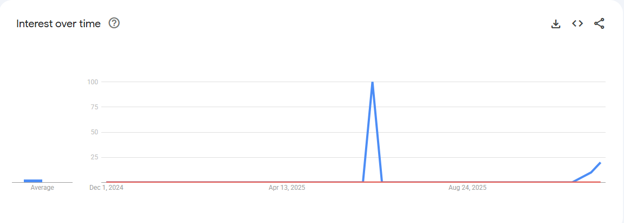
Step 1: Virtual Training Session / Virtual Training Workshop
Google Trends showed minimal searches for “virtual training session” while “virtual training workshop” didn’t register.
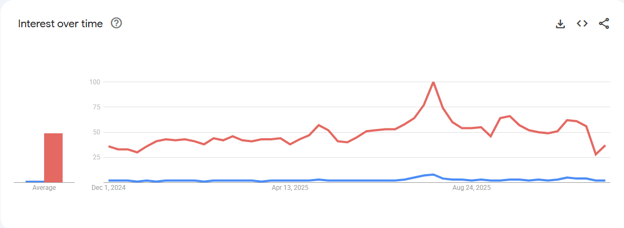
Step 2: Online Training / Online Workshop
“Online training” registered steady low searches (red) while “online workshop” showed minimal searches (blue).
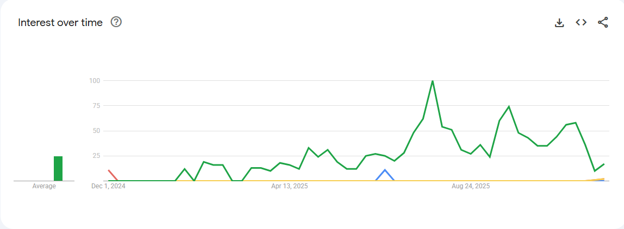
Step 3: Live Online Training / Live Virtual Workshop
“Live online training” showed steady searches (green) while “live virtual workshop” minimal searches (blue).
Step 4: Training Webinar / Live Training Webinar
“Live training webinar” registered minimal searches (blue) but Google Trends showed steady searches for “training webinar” (red).
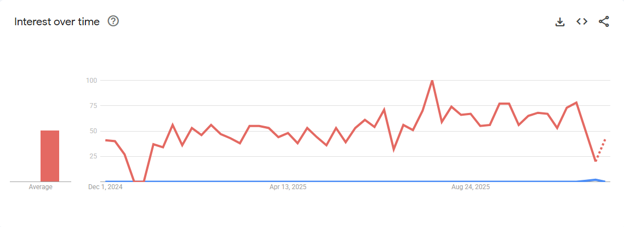
Google Trends told us that “Training Webinar” and “Online Training” were our best bets from a search perspective. When we provided the results from Google Trends we found that it lined up well with the words our customers use, providing the final clarity about what terms we should focus on. Again, it isn’t what we would call them, but it is the phrase our prospects use!
Rank Math SEO plugin for WordPress
Once I enter my content into WordPress I turned to the most critical tool in my on-page SEO toolkit, Rank Math SEO Pro.
I have developed a SEO-friendly article workflow that starts outside of WordPress to keep my creativity fluid. I typically create my initial articles in Google Docs and use AI to help me brainstorm ideas, refine my outline, or generate different angles for a topic. This allows me to focus purely on the quality of the information without getting distracted by technical settings.
Once the draft is ready, I move the content into WordPress, and that is where Rank Math becomes essential. I have grown to trust Rank Math as part of this process because of how well it fits into a practical process. I use it to fine tune the article and perform a final audit of my on-page SEO. It acts as a safety net, grading the content with a real-time score and providing specific recommendations to ensure I have not overlooked critical details like keyword density, proper heading usage, or meta descriptions.
Once your article is live and you’re monitoring, I turn to several key Rank Math features to tell me how well the article is doing. You’ll notice that most of these features are really a nice way to see data from the free Google tools, but these tools make it much easier to access the data I want to look at daily.
Visualize Your Content with HeadingsMap
Maintaining a clean and logical hierarchy is often the difference between a page that ranks and one that gets lost in the noise; the HeadingsMap extension is an invaluable tool for audit purposes. By using this browser extension, you can generate a visual tree of all your H1, H2, and H3 tags to ensure your document structure flows correctly without any skipped levels. This bird’s eye view makes it immediately obvious if you have accidentally used an H3 where an H2 should be or if your most important keywords are buried too deep in the subheadings.
“Header tags are helpful for users and search engines. For your users, they give them a preview of the content they’re about to read. For search engines like Google, header tags provide context and a hierarchy for your page. Think of header tags as chapter titles in a book.” – How To Use Header Tags: SEO Best Practices
This is not the most common tool recommended for SEO, but when I found it I immediately got better at SEO. When you use HeadingsMap, you are essentially seeing your site through the eyes of a search crawler.
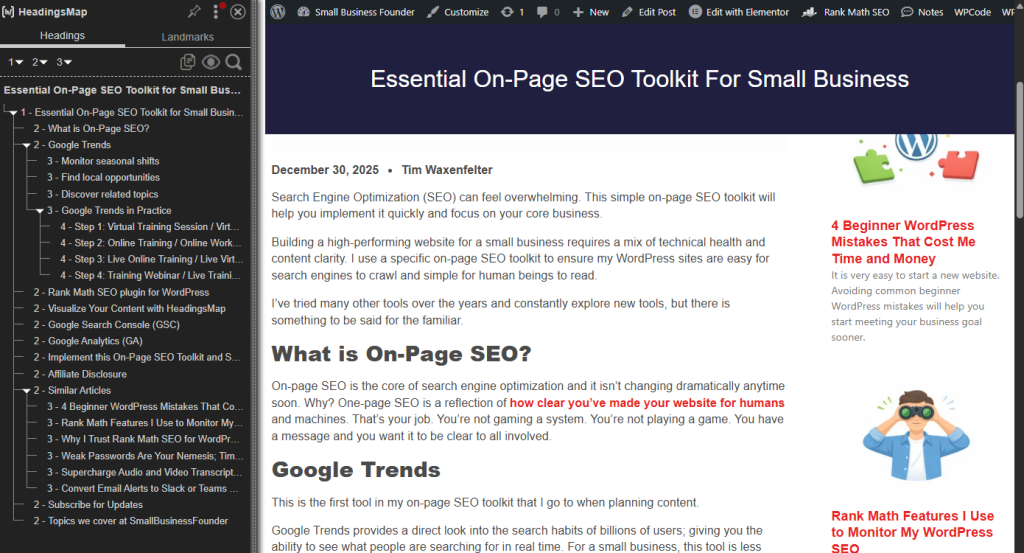
I started using this on the recommendation of a client because we were creating training in Moodle and it was important to have a clear header structure. Once I started using it I fell in love. I realized that I was using header levels for formatting and sometimes completely miscommunicating the structure of my page.
It helps you verify that your primary topic is clearly supported by your sub-sections; moreover, it ensures your content is accessible to readers who use screen readers to navigate via headers. Regularly checking your posts with this extension allows you to catch structural errors before they impact your performance, keeping your site organized and professional.
Google Search Console (GSC)
Google Search Console is not only easy to use but is also another free tool in my on-page SEO toolkit!
Google Search Console is a free service that acts as a direct line of communication between my site and Google. It provides a detailed look at how the site appears in search results, including which keywords are driving traffic and how often users click through to my pages.
I use GSC to monitor the technical health of the site by checking for indexing errors and reviewing Core Web Vitals to ensure fast loading speeds. It is my go-to tool for finding “low-hanging fruit” keywords—terms where I already rank on the first or second page but could reach the top with minor content updates.
Google Analytics (GA)
While Google Search Console focuses on how users find the site, Google Analytics tracks what they do once they arrive. It provides deep insights into user behavior, such as which pages keep people engaged the longest and where they tend to exit the site.
I use GA to measure the success of my marketing efforts by tracking traffic sources and conversion rates. For a small business, I focus on the “engagement rate” to understand if my content is truly resonating with the audience, though I typically check this less frequently than Search Console to avoid getting lost in unnecessary data.
Implement this On-Page SEO Toolkit and See Results
Implementing this on-page SEO toolkit transforms on-page SEO from a technical burden into a predictable and repeatable workflow for your small business. By starting with Google Trends, you ensure your content is built on the foundation of actual customer demand and local interest. Once you begin drafting, the Rank Math SEO plugin serves as your final technical audit within WordPress, while the HeadingsMap extension allows you to visualize and correct your page structure for both search engines and human readers.
Finally, using the direct feedback loops provided by Google Search Console and Google Analytics enables you to move beyond guessing and start making data-driven decisions that improve your search rankings and user engagement over time.


