Small changes in the way you document your work can measurably improve productivity for you and your team. Small business owners can’t afford to waste time and money on unproductive processes.
Why are we talking about Documentation?
My co-founder Brian and I had went to GWU in DC together when each dorm room had a landline and communication was fairly simple. We were in the first class at GW that were assigned email addresses by default. I finally “found” the world wide web in my sophomore year. Communicating in person, by phone, and occasionally by email was the norm. In the first office I worked in we had email addresses and left notes in the database we used. Communication was still rather centralized due to the nature of the options.
In 2015, Brian and I were on different coasts of the US and were starting a business. I had struggled with managing communication in email. About once every few months I commit to inbox zero. I still convince myself after all these years that I could do it daily if I wanted. We knew we had some challenges with distance and would need to find some processes. For note taking, we quickly adopted Google Docs so that we could see everything that was being typed (I believe we were even using a tool that Google bought).
Since there was a time difference between Brian and I we were also sending messages to each other at odd hours. My brain just couldn’t handle the emails back and forth that were referencing projects and opportunities out of context. Brian came up with the solution. He was using HipChat with a group of professionals to share ideas. We adopted it that day! A few months later I discovered Slack and we switched over. In these experiences, we found that to grow our business we would have to do a better job documenting our work and making it easy for the other person to find what we did and take action.
We have worked with hundreds of organizations and rarely do we find one who wouldn’t improve productivity if they focused energy on documenting for retrieval.
That said, I’ve only encountered only a few people in the last 25 years who get excited about documentation. I admit that it isn’t an exciting topic. The truth is that no matter what type of company you’re working in, documentation is a huge part of your work. It may take different forms. For example:
- In a software development company or an elearning company like mine, you may document issues in software using tools like Jira, Trello, or Marker.
- Before AI tools like those built in to Zoom (or purchased separately like Fathom) someone was responsible for documenting the actions items and decisions.
- Whether you used Microsoft Teams, Slack, or email (hopefully not) to communicate with your teammates, you’re consistently documenting conversations, decisions, etc.
- When you hand another person a file, share a task in a task management tool, you are documenting what has happened and what needs to happen.
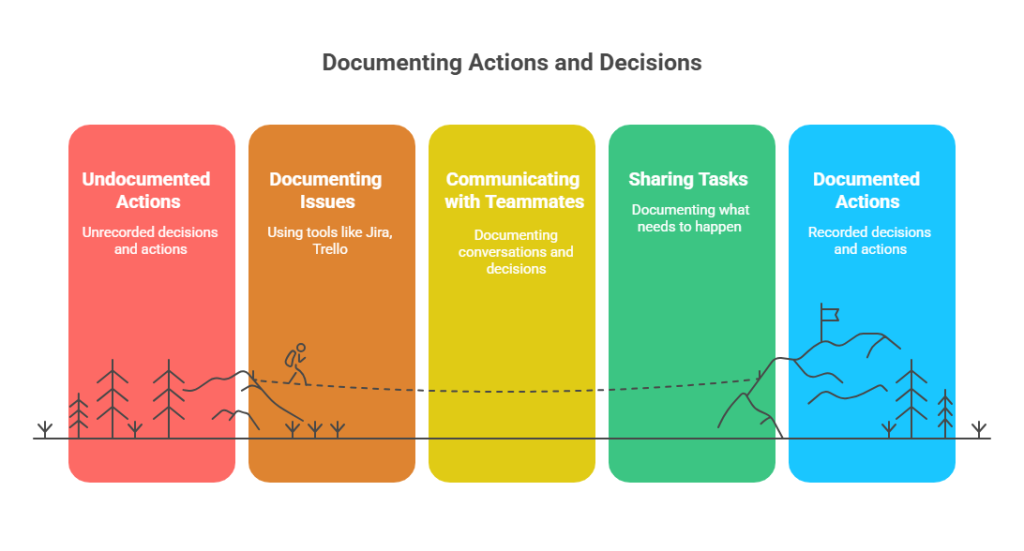
At Endurance Learning, our philosophy is that when we document in these and other stages, we write for retrieval, not storage.
What’s the Difference Between Storage and Retrieval?

Generally, it is our instinct to store information. Imagine you were at an event and someone named Phoenix wrote their phone number on the back of a scrap of paper. They asked you to give them a call when you wanted to connect about a business opportunity. When you received that, you knew exactly who and why. Congratulations! You did a great job storing this information.
Two weeks later, you pick up that piece of paper and stare at a phone number. You recognize the area code and remember someone handing this to you. You know that it was someone that was at that event you attended. You spend 20 minutes doing searches online and may or may not jog your memory. It took 15 seconds to store the information and 20 minutes to retrieve and a minute to leave a message once you remembered (though you weren’t 100% confident you had the right name). Your total spend on this was 21 minutes and 15 seconds.
Now, let’s say you wanted to store for retrieval. After your conversation with Phoenix you write down a sentence that says “Met Phoenix and the networking mixer on 3/17/2025 and talked about business opportunities. Phone: 555-6729”. That took 60 seconds (or roughly 4 times the effort) to store this information, but your retrieval time is almost instant! Look how much you improved productivity!
This story becomes more compelling when someone else has to pick up your work because you’re on leave or are busy on another project. Whether you’re storing information for yourself or for others, remembering to store for retrieval will consistently provide benefits.
Calculating the Impact of One Bad Ticket
This became a passion for us at Endurance Learning because we watched our projects take longer than needed with more rounds of internal revisions. Our work is often focused on the details of a customer project. This is a real example from a real project. The names have been removed because these are amazing people who do amazing work every day. They are not alone in these mistakes. Once I started preaching to the team about documentation I also started to get justified feedback about my own sloppy documentation.
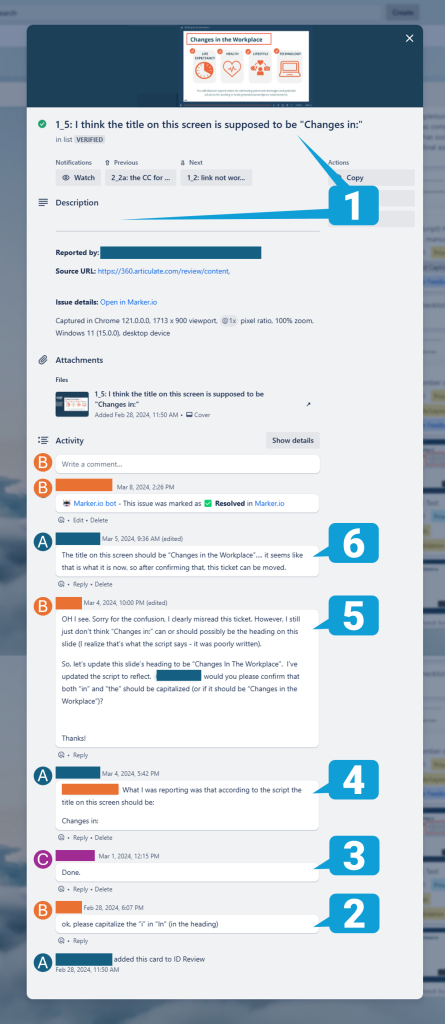
Each numbered step in the table connects to a number in the Trello ticket so you can follow along and see the impact of our unclear documentation.
| # | Action | T i m e |
|---|---|---|
| 1 | User A documented the issue. User A was a little uncertain in their title of the ticket saying “I think…”. They also didn’t spend time writing a description. | 3 |
| 2 | User B decided to go back to the script and verify. User B couldn’t see why the title would be shortened so assumed it was a capitalization issue and tried add clarity. User B moved it along to User C before clarifying with User A. Bad documentation followed by assumptions always leads to extra work. | 2 |
| 3 | User C completed the change. While not essential, this user could have said “Done. Change to ‘Changes in …’ so the next user knew how they interpreted it. | 5 |
| 4 | User A goes back to the script to verify what she was originally saying and then added clarity that these interpretations were wrong. The ticket was meant to say that the script was inconsistent with the developed module. Clearly this should have been documented in the original ticket. Even User A spent extra time trying to remember what they meant. | 8 |
| 5 | User B spends time re-reading the script and realizes that the issue is that the script was wrong. User B makes that change and spends time clarifying. This is the clearest the ticket has been and we’re not several days into the ticket. | 10 |
| 6 | User A documents the completion of the ticket per the new description. | 5 |
| TOTAL | 33 |
This ticket took a week to resolve and 33 minutes of the team’s time. There was no change to the title. There is a Step 0 to this process. The elearning module’s title was updated but the script wasn’t. User A was right to find this discrepancy. If the original person who made the change had updated the script, this 33 minutes would have never been spent.
At Step 1, User A should have clearly stated that the script says “Changes in:” and the module says “Changes in the Workplace”. Please verify which version is correct.
User B would have then verified and updated the script (which they did in Step 5) and said the ticket was resolved. That would have taken roughly 10 minutes total.
This matters because we often have 30 or more tickets. Improving this process across 30 tickets reduces the overall spend of staff time from 16.5 hours (30 tickets x 33 minutes = 990/60 min = 16.5 hours) to 5 hours (30 tickets x 10 minutes = 300/60 min = 5 hours). We just saved 11.5 hours! If we use a conservative loaded coast for staff of $75/hour, we just saved $862.50 and we cut days of the process which means our customer is happier!
Documenting for retrieval – organizing information so it can be quickly found, understood, and used when needed – is a small but intentional shift that can profoundly improve productivity, efficiency, and collaboration.
And the best part? It doesn’t take much extra time to document well—especially if it’s done in the flow of work.
The High Cost of Poor Documentation
What is the risk of poor documentation?
- Wasted Time/Money: A missing file, an ambiguous project note, or a hard-to-locate email sequence can force team members to hunt through systems or reach out to others for clarification.
- Bottlenecks and Delays: If only one person knows where something is stored or how to use a system, projects can be delayed while others wait for access or answers.
- Freedom to Take Time Off: If the context of an action lives in your head, then you always need to be available when questions arise. If it is well documented, you are much less likely to get an emergency message.
- Reduced Efficiency: Teams spend time doing redundant work because previous efforts are not easily retrievable. This can also lead to inconsistent outputs, as staff reinvent processes or duplicate tasks unnecessarily.
- Frustration: Our team wants to be doing creative work, not trying to track down information or redo work because something wasn’t documented and stored for retrieval.
Minimal Effort for Maximum Impact: 4 Key Practices to Improve Productivity
I try to live this philosophy of work every day. I’m not always successful. I sometimes cut corners knowing that I’ll surely have more time later to make a note. To ensure that the burden is not all on me or my team to remember to do this, I believe in implementing the following practices:
1. Document in Real-Time. When you’re already doing the work, capturing key steps, insights, or outputs takes just seconds. The mental effort is low since the context is fresh. Later on, remembering these details can take significantly longer and we’re much less likely to document it later. Adding a project status update or tagging a file correctly takes 10 seconds in the moment but can save teammates hours of guesswork later.
2. Use Clear Naming Conventions and Tags. Give documents meaningful names that reflect their purpose and content. Avoid vague terms like “Final_V2” or “Meeting Notes” without specifying which meeting. Use the ISO date format because it always sorts well and you never have to guess which one is the month, year or date (YYYY-MM-DD). A 4 digit year is obvious. The dashes make the month and date easy to isolate. Always using this ISO format also means that in a table they align together instead of some being shorter like 2025-9-1.
3. Link to documents when you reference. Integrate key documentation directly into your tools and processes. Most tools have a way to create direct links. In the example above you can link to a specific Trello ticket, a Google Doc (even down to a particular header), a Slack message, etc.
4. Create Living Documents. We call our documentation of customer conversations “Running Notes” because they are in one shared document with the latest meeting at the top. This makes it easy to search for recent conversations while talking with them. While searching a set of documents in a folder may work, it is always easy to search within a document. This narrows the scope so much that you can very quickly get answers about discussions in very few steps.
This article assumes that you have tools in place that will help you document better. While Google docs or note pad could be enough, it is worth taking a look at SaaS tools that can improve your efficiency.
Retrieval-Focused Documentation in Action
Making documentation a habit is a great starting point for improving how your team operates. The next strategy that we’ve seen work well is to target specific work areas.
Onboarding
If your team regularly adds new people to your team permanently, seasonally or even for occasional work, you likely can gain some real efficiency by improving your documentation. When you add a new person to a team there is likely a range of organizational information that takes time and experience to learn. Organizing relevant documentation like onboarding instructions, templates, or process guides can dramatically reduce the time spent by a new employee or contractor, reduces the support needed by you or other employees, and gets the new person to peak performance faster. If documentation is poorly labeled or scattered, onboarding slows, leading to missed deadlines and frustrations on both sides.
Marketing Processes
Marketing systems are a regular source of frustration for me. Because marketing is one of my many hats, each time I step in to help or to troubleshoot a system, I completely forget how I set up a form or tool. If I haven’t created good documentation, I find myself wasting time learning the same process and making many of the same mistakes I made previously. If email templates and sequences are clearly documented in your email tool with embedded instructions, team members can confidently execute campaigns without bottlenecks. Without that structure, campaigns get delayed while people search for missing details or clarify processes with colleagues.
Conclusion: Don’t Just Store It; Document for Use
Effective documentation isn’t about perfection or length. It’s about making things easy to find and understand when needed. The small seconds spent capturing information thoughtfully; naming a file, adding a note, or tagging a project; can save your team hours down the road.
At the end of the day, documenting for retrieval means that everyone works smarter, not harder. It’s about empowering people to find the right information at the right time, without the need for extra effort or frustration. The result? More time spent on meaningful work and less time lost searching for what’s already been done.
So the next time you think about skipping those few extra seconds of documentation, consider the trade-off: A bit of effort now means fewer bottlenecks, faster workflows, and a more efficient team later.